 訂閱
訂閱 上一篇
上一篇 返回
返回 下一篇
下一篇
[深入評測] 超世代極速玩家機 D-Link DIR-655(4)
作者: Aven 日期: 2011-10-31 10:44


網路傳輸效能
DWA-160
這次測試特地選用了 D-Link DWA-160 雙頻段無線網卡,DWA-160 符合 802.11 a/b/g/n 規格,具備 2.4GHz/5GHz 雙頻無線連線頻段。雖然 DIR-655 仍屬於 2.4GHz 單頻段規格,但為長遠考量以並希望未來有機會測試如 DIR-8XX 系列雙頻段機種,所以還是先敗了一隻回來。 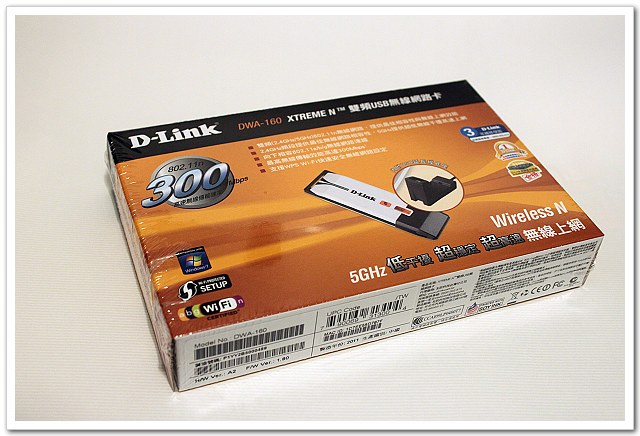
DWA-160 與 USB 外接延長底座組合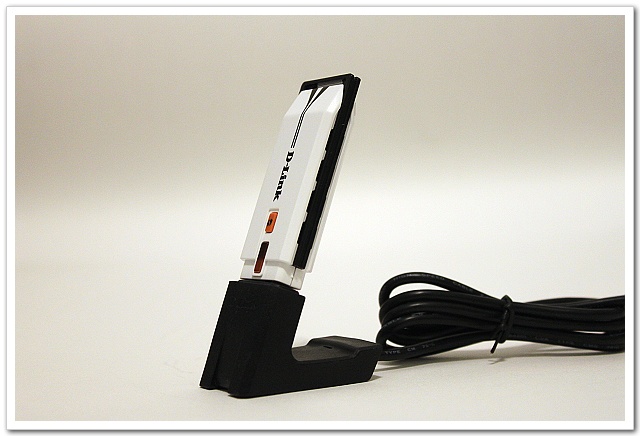
產品特色
•符合 IEEE 802.11 a/b/g/n 無線網路
•具備 2.4GHz/5GHz 雙頻無線連線頻段
•支援 WPA與 WPA2保障無線網路存取安全
•D-Link Xtreme N雙頻無線技術提供高效能無線網路連線
•提供 USB 外接延伸底座,方便網卡擺設最佳連線位置
•支援 WPS Wi-Fi 快速安全無線網路設定
•提供無線網路連線工具軟體
•適合桌上型 / 筆記型電腦升級高速雙頻 802.11n 無線網卡使用
測試環境:
Server:QNAP TS-459 Pro+
PC:ASUS EeeBOX B204 + D-Link DWA-160 Dual-band 無線網路卡
SPI Firewall:disable
Jumbo Frame:disable
QoS Engine:disable
LAN to LAN:929Mbps
> iperf -c 192.168.2.100 -w 128k -t 60 -P 5 ------------------------------------------------------------ Client connecting to 192.168.2.100, TCP port 5001 TCP window size: 256 KByte (WARNING: requested 128 KByte) ------------------------------------------------------------ [ 7] local 192.168.2.90 port 52834 connected with 192.168.2.100 port 5001 [ 3] local 192.168.2.90 port 52830 connected with 192.168.2.100 port 5001 [ 5] local 192.168.2.90 port 52832 connected with 192.168.2.100 port 5001 [ 4] local 192.168.2.90 port 52831 connected with 192.168.2.100 port 5001 [ 6] local 192.168.2.90 port 52833 connected with 192.168.2.100 port 5001 [ ID] Interval Transfer Bandwidth [ 3] 0.0-60.0 sec 1.34 GBytes 192 Mbits/sec [ ID] Interval Transfer Bandwidth [ 6] 0.0-60.0 sec 1.34 GBytes 191 Mbits/sec [ ID] Interval Transfer Bandwidth [ 7] 0.0-60.0 sec 1.24 GBytes 177 Mbits/sec [ ID] Interval Transfer Bandwidth [ 4] 0.0-60.0 sec 1.32 GBytes 190 Mbits/sec [ ID] Interval Transfer Bandwidth [ 5] 0.0-60.0 sec 1.25 GBytes 179 Mbits/sec [SUM] 0.0-60.0 sec 6.49 GBytes 929 Mbits/sec
WLAN to LAN:131Mbps
> iperf -c 192.168.2.90 -w 128k -t 60 -P 5 ------------------------------------------------------------ Client connecting to 192.168.2.90, TCP port 5001 TCP window size: 128 KByte ------------------------------------------------------------ [1864] local 192.168.2.103 port 2405 connected with 192.168.2.90 port 5001 [1880] local 192.168.2.103 port 2404 connected with 192.168.2.90 port 5001 [1896] local 192.168.2.103 port 2403 connected with 192.168.2.90 port 5001 [1848] local 192.168.2.103 port 2406 connected with 192.168.2.90 port 5001 [1912] local 192.168.2.103 port 2402 connected with 192.168.2.90 port 5001 [ ID] Interval Transfer Bandwidth [1896] 0.0-60.0 sec 181 MBytes 25.3 Mbits/sec [1864] 0.0-60.0 sec 177 MBytes 24.7 Mbits/sec [1880] 0.0-60.0 sec 197 MBytes 27.5 Mbits/sec [1848] 0.0-60.0 sec 185 MBytes 25.8 Mbits/sec [1912] 0.0-60.0 sec 196 MBytes 27.3 Mbits/sec [SUM] 0.0-60.1 sec 934 MBytes 131 Mbits/sec
WAN to LAN:421Mbps
> iperf -c 192.168.2.10 -w 128k -t 60 -P 5(SPI off) ------------------------------------------------------------ Client connecting to 192.168.2.10, TCP port 5001 TCP window size: 256 KByte (WARNING: requested 128 KByte) ------------------------------------------------------------ [ 7] local 192.168.2.90 port 53141 connected with 192.168.2.10 port 5001 [ 4] local 192.168.2.90 port 53137 connected with 192.168.2.10 port 5001 [ 3] local 192.168.2.90 port 53138 connected with 192.168.2.10 port 5001 [ 5] local 192.168.2.90 port 53139 connected with 192.168.2.10 port 5001 [ 6] local 192.168.2.90 port 53140 connected with 192.168.2.10 port 5001 [ ID] Interval Transfer Bandwidth [ 7] 0.0-60.0 sec 525 MBytes 73.4 Mbits/sec [ ID] Interval Transfer Bandwidth [ 4] 0.0-60.0 sec 625 MBytes 87.4 Mbits/sec [ ID] Interval Transfer Bandwidth [ 6] 0.0-60.0 sec 621 MBytes 86.8 Mbits/sec [ ID] Interval Transfer Bandwidth [ 3] 0.0-60.0 sec 623 MBytes 87.1 Mbits/sec [ ID] Interval Transfer Bandwidth [ 5] 0.0-60.0 sec 614 MBytes 85.9 Mbits/sec [SUM] 0.0-60.0 sec 2.94 GBytes 421 Mbits/sec
LAN to WAN:360Mbps
> iperf -c 192.168.2.22 -w 128k -t 60 -P 5 ------------------------------------------------------------ Client connecting to 192.168.2.22, TCP port 5001 TCP window size: 256 KByte (WARNING: requested 128 KByte) ------------------------------------------------------------ [ 7] local 192.168.3.90 port 45320 connected with 192.168.2.22 port 5001 [ 3] local 192.168.3.90 port 45317 connected with 192.168.2.22 port 5001 [ 4] local 192.168.3.90 port 45316 connected with 192.168.2.22 port 5001 [ 6] local 192.168.3.90 port 45318 connected with 192.168.2.22 port 5001 [ 5] local 192.168.3.90 port 45319 connected with 192.168.2.22 port 5001 [ ID] Interval Transfer Bandwidth [ 6] 0.0-60.0 sec 507 MBytes 70.9 Mbits/sec [ ID] Interval Transfer Bandwidth [ 4] 0.0-60.0 sec 536 MBytes 74.9 Mbits/sec [ ID] Interval Transfer Bandwidth [ 5] 0.0-60.0 sec 517 MBytes 72.2 Mbits/sec [ ID] Interval Transfer Bandwidth [ 3] 0.0-60.0 sec 487 MBytes 68.1 Mbits/sec [ ID] Interval Transfer Bandwidth [ 7] 0.0-60.0 sec 529 MBytes 74.0 Mbits/sec [SUM] 0.0-60.0 sec 2.52 GBytes 360 Mbits/sec
以下將實測數據整理成圖表方便閱讀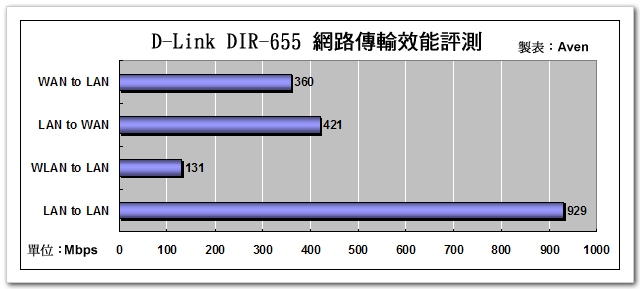
USB Share Port 讀寫效能
測試環境:
PC:ASUS EeeBOX B204
USB HDD:500GB HD NTFS
檔案格式:ubuntu 10.04 iso檔 688.7MB
寫入速度:5.90MB/s,讀取速度:10.82MB/s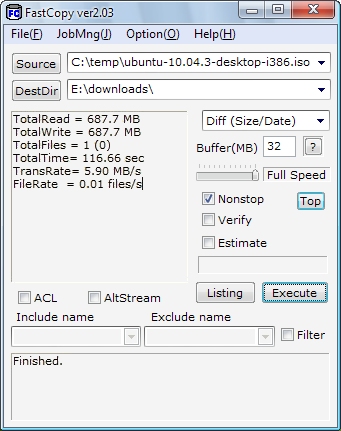
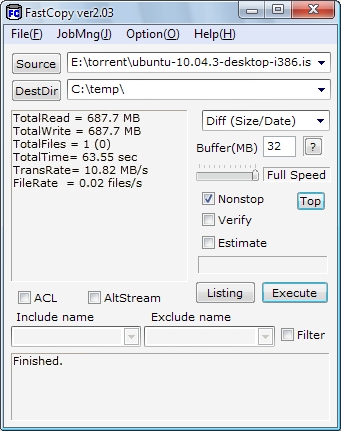
Share port 功能測試
測試事物機:HP Deskjet F380
測完磁碟讀寫效能,也來測一下多工事物機的掃描功能,Share Port 使用的是 USB over IP 的技術,此技術可透過 TCP/IP 網路遠端分享 USB 裝置,因此當我啟動 Share Port 功能時,在 DIR-655 USB port 接上 HP Deskjet F380,電腦桌面會立即跳出發現新裝置,此時若點選"連線"即模擬本機接上此一裝置。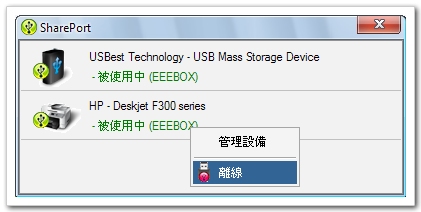
下圖則是透過 Share Port 功能成功連接 HP Deskjet F380,執行掃描功能試掃 DIR-655 外盒。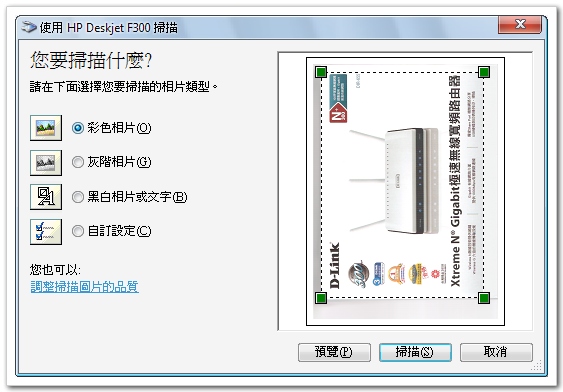
節能效果
我們做個實驗,檢視當DIR-655同時接了四台電腦時,此時電力使用約 8W 左右,若將所有電腦關閉時,此時DIR-655 會自動偵測電腦離線並調整電力,使用電力約 3W 左右,省電效果令人驚訝。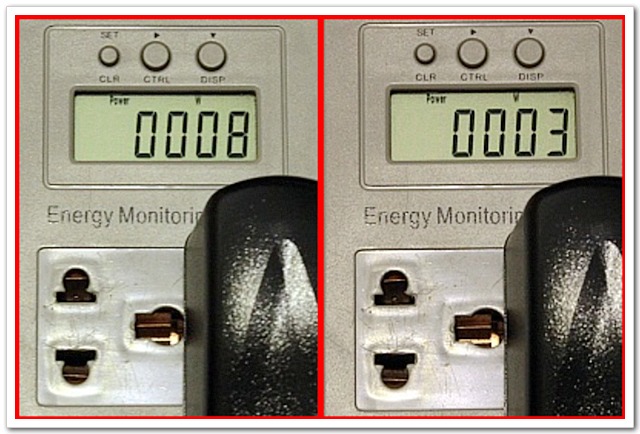
無線網路品質
我們找了一台刷了水果牌韌體的機器一同比較,在此不做訊號強弱的比較,因為這是可被調整的,我們僅就無線訊號穩定度做個比較。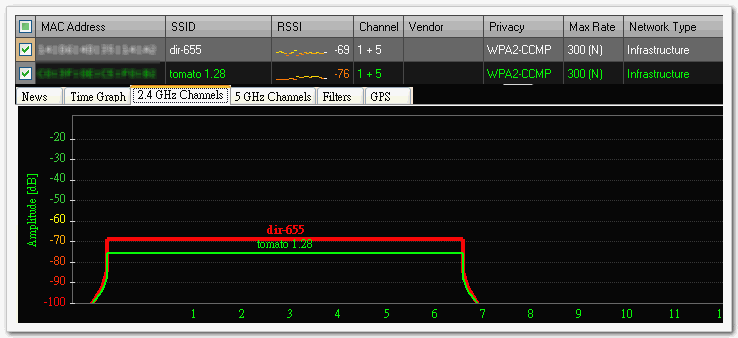
動態測試
我們拿著一台筆電從距離這兩AP約1公尺左右的位置移動到隔兩道牆的另一個房間,藉此觀察無線訊號的品質表現,其實大多時段兩者穩定度相當,只是水果牌無線訊號偶有瞬間驟降的現象(下圖綠線),而 DIR-655 無線訊號相對穩定一些。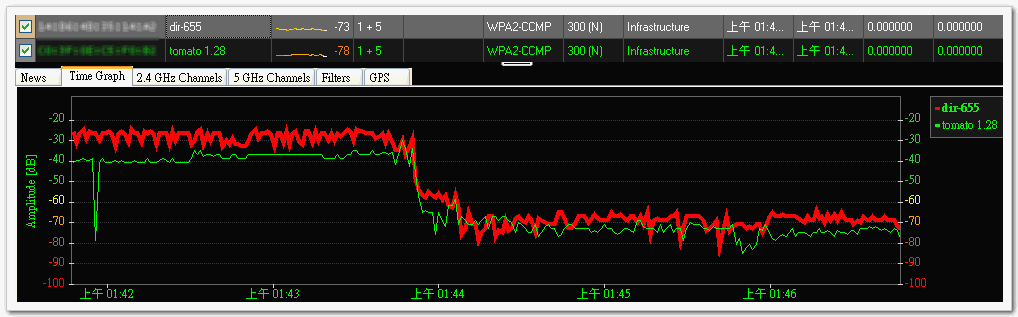
總結
今年拜電信市場龍頭之賜,中華電信推出 50M 千元有找的優惠方案,已造就不小的網路升級風潮;此外隨著"私有雲端"應用普及,網路磁碟機 - NAS 逐漸深入家庭,家庭化的雲端實現了資料備份及串流影片播放等新型態的應用;另一方面不能不提的是智慧手機、平板電腦的盛行,大量電子書報雜誌、熱門遊戲的 APP 下載等需求,上述三項應用需求同時考驗著家用無線網路的傳輸能力及品質。而綜觀 DIR-655 的特性:超過 300Mbps 以上的 NAT 效能,高達 929Mbps Gigabit 區網傳輸實力以及符合 802.11n 高速無線技術並搭配三支外接式天線的穩定無線連線品質,DIR-655 適時滿足了數位化家庭的需求,而且一台搞定。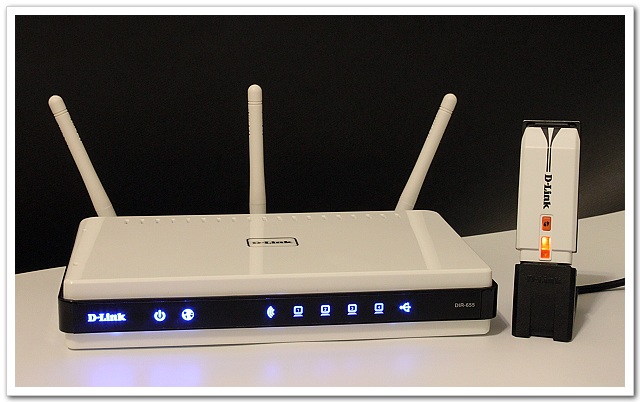
 引用通告地址:
點擊獲取引用地址
引用通告地址:
點擊獲取引用地址
 trezoriostart
[ 2025-12-08 02:57 | 回覆
| 編輯/刪除 ]
trezoriostart
[ 2025-12-08 02:57 | 回覆
| 編輯/刪除 ]
 |

 trezoeriostarte

